AI Assistant Tool Guide: What You Can Ask and What Needs Approval
A complete guide to the Caseta AI assistant tools, grouped by job, with example prompts, approval rules and plan availability.
Overview
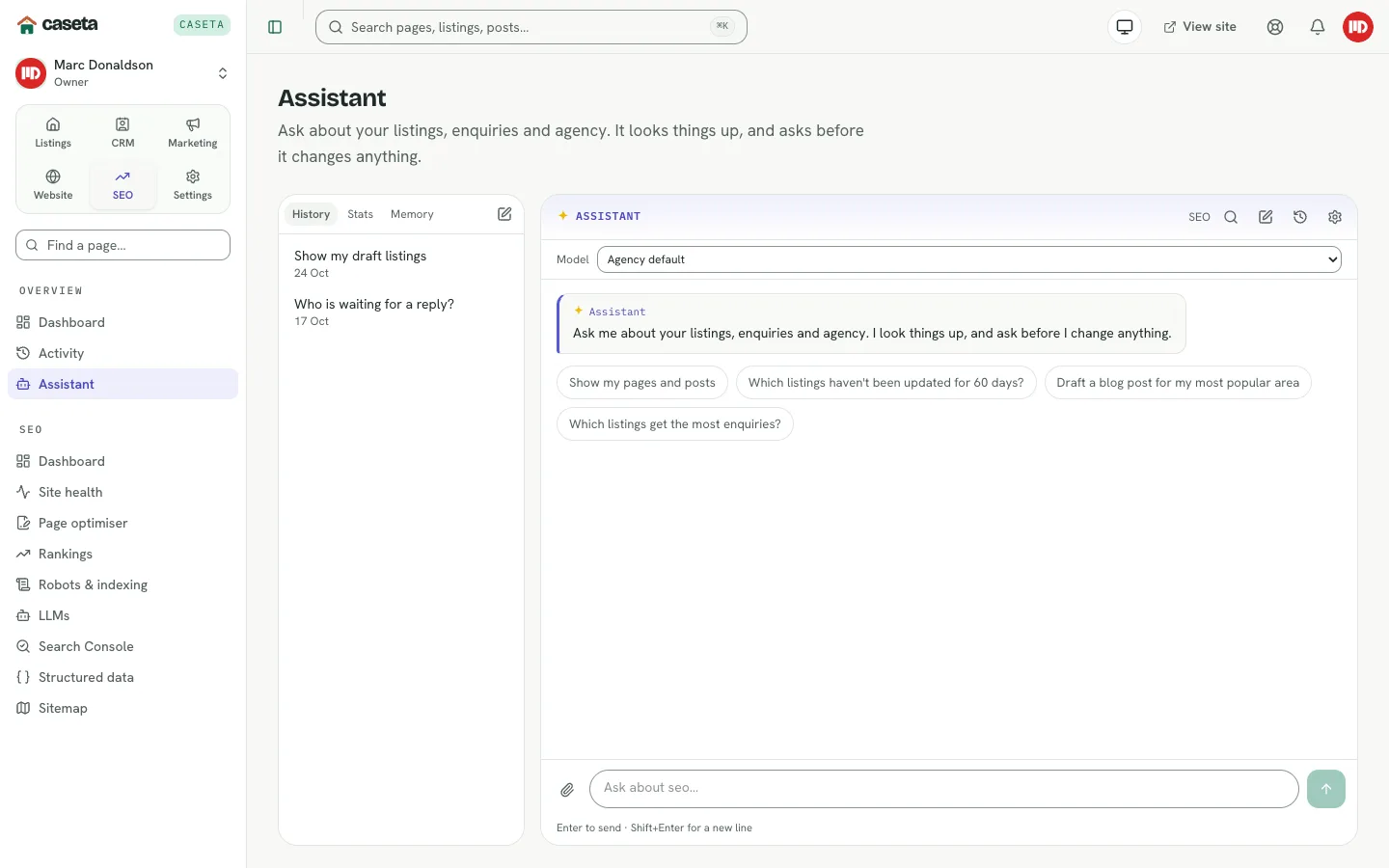
The assistant does not answer from a fixed script. It uses tools tied to your agency's own data: listings, enquiries, contacts, deals, tasks, viewings, website content, social posts and portal feeds. It chooses the right tools for your question, reads the result, and turns it into a short answer with cards for the records it found.
Some requests only need a read. Others would change data, so the assistant produces a proposal that you must approve. Before a change it checks your role and plan; when it runs several tools in one answer, the status line names each step, such as Fetching listing 1, Fetching listing 2, Checking your role or Checking your plan and usage.
A few tools depend on paid modules; if your plan does not include them, the assistant offers an upgrade instead of pretending to do the work.
Who is this for?
Any signed-in member whose organisation has the assistant enabled and whose access grant includes the AI assistant area. Owners and admins can use every tool their plan includes; restricted members only get tools for the areas they can open.
Before you begin
- The assistant must be switched on for the organisation.
- A default AI provider must be connected in Settings → AI, or the agency needs a
shared provider included in its plan.
- Web research also needs the web-search configuration; otherwise the assistant says
search is unavailable instead of pretending to browse.
How to open it
Open Overview → Assistant, use the floating Ask AI button, or type a question in the dashboard ask box. The assistant keeps a history you can reopen. It also has memory notes you can review and remove.
Plan availability at a glance
| Area | Free | Solo | Team |
|---|---|---|---|
| Ask about listings, enquiries, website, SEO and plans | Yes | Yes | Yes |
| CRM tools: contacts, deals, tasks, viewings, reports | No | Yes | Yes |
| Marketing tools: social posts, calendar, approvals, analytics | No | Yes | Yes |
| Portal feeds and feed status | No | Yes | Yes |
| Actions: approvals for changes | Yes | Yes | Yes |
When a paid tool is missing, the assistant should explain that you need Solo or Team and show an Upgrade plan button that opens Settings → Plan. If it does not, ask “What is my plan?” and it will show the plan and usage card.
1. Finding anything fast
Plan: Free · Solo · Team
Use these when you know a name, reference, town or vague phrase but not where it lives.
| Tool | What it does | Approval |
|---|---|---|
search_everything | Searches listings, enquiries, pages, posts and locations at once | Read only |
find_listings | Filters listings by words, town, feed, price, bedrooms, sale/rent and market status | Read only |
listing_summary | Shows one listing's facts, features, completeness and enquiry count | Read only |
find_enquiries | Filters enquiries by words, status, listing and recency | Read only |
enquiry_summary | Shows one enquiry's full message, property and repeat-contact history | Read only |
find_contacts | Finds the people behind enquiries by name, email or phone | Read only |
contact_history | Shows everything one person has enquired about | Read only |
list_locations | Lists regions, towns and areas with listing counts | Read only |
list_content | Lists website pages or posts with status and publish date | Read only |
list_media | Lists uploaded photos and PDFs, including where they are used | Read only |
list_redirects | Lists manual and automatic redirects | Read only |
list_team | Lists team members and pending invitations (owners/admins) | Read only |
plan_usage | Shows the plan and how much of each limit is used | Read only |
agency_overview | Shows published, draft, reserved and sold listings, new enquiries and plan usage | Read only |
Example prompts
- “Find all three-bedroom villas in Rojales under €400,000.”
- “Who enquired about the villa on Calle Mayor, and have they written before?”
- “What is my plan and how much of it have I used this month?”
2. Listings, pricing and property insights
Plan: Free · Solo · Team
These tools work on your own stock. They never claim to know the wider market.
| Tool | What it does | Approval |
|---|---|---|
compare_listings | Compares two to four listings side by side | Read only |
rank_listings | Ranks listings by enquiries, days on market, price drop or price | Read only |
comparable_listings | Finds your own similar listings to judge a price | Read only |
stale_listings | Lists published listings nobody has touched for a while | Read only |
listings_breakdown | Splits listings by town, type, website status or market status | Read only |
incomplete_listings | Finds listings missing photos, price or description | Read only |
recent_listings | Lists listings added in the last N days | Read only |
market_snapshot | Shows your stock by town: available count, median price, price per m² and time on market | Read only |
price_changes | Lists reductions and increases | Read only |
price_gap_check | Checks whether one listing is priced in line with your comparables | Read only |
listing_seo_audit | Scores listings for search and selling basics | Read only |
duplicate_titles | Finds listings that share a title | Read only |
missing_translations | Finds listings available in only one language | Read only |
geocode_place | Finds a town or address on the map | Read only |
climate_for_town | Shows monthly climate averages for a place | Read only |
suggest_property_links | Finds listings that fit a blog topic and returns their short codes | Read only |
Example prompts
- “Which listings have been on the market the longest?”
- “Is the villa at €250,000 priced in line with our similar listings?”
- “Compare the three Orihuela properties side by side.”
3. Enquiries and follow-up
Plan: Free · Solo · Team
| Tool | What it does | Approval |
|---|---|---|
unanswered_enquiries | Lists enquiries still marked new after a few days | Read only |
enquiry_breakdown | Splits enquiries by source/status and shows the listings that drew the most | Read only |
enquiries_by_listing | Shows which listings draw the most enquiries | Read only |
repeat_enquirers | Finds people who have written more than once | Read only |
response_times | Measures how quickly the team replies | Read only |
draft_enquiry_reply | Prepares a reply for you to copy or open in your mail app | Read only |
The draft is not sent. It is a ready-to-use message; copy it or open it in your mail app, then send it yourself.
Example prompts
- “Which enquiries have been waiting more than two days?”
- “Which properties got the most enquiries this month?”
- “Draft a friendly reply to the latest enquiry about the apartment in Torrevieja.”
4. CRM and pipeline
Plan: Solo · Team — the CRM module is required.
| Tool | What it does | Approval |
|---|---|---|
crm_overview | Contacts, open deals, pipeline value, stuck deals, tasks and follow-ups | Read only |
find_crm_contacts | Searches the CRM contact book by name, email, phone, tag or status | Read only |
crm_contact_summary | Shows roles, tags, source, requirements, timeline, tasks, deals, matches and documents | Read only |
find_deals | Filters deals by stage, contact, assignee or stuck state | Read only |
deal_summary | Shows one deal's contact, property, stage history, tasks and documents | Read only |
find_tasks | Shows mine, team, overdue, today, upcoming, completed or all tasks | Read only |
find_viewings | Shows today, upcoming, pipeline, mine, completed or all viewings | Read only |
crm_followups | Shows follow-up rules, counts and latest drafts | Read only |
crm_matches | Shows matches for a buyer or a property | Read only |
crm_reports | Shows the funnel, sources and task totals | Read only |
list_collaborations | Shows shared properties, partners and registered buyers | Read only |
list_commissions | Shows expected, invoiced and paid commission lines | Read only |
list_segments | Shows saved contact segments and current match counts | Read only |
find_duplicate_contacts | Finds contacts sharing an email or phone number | Read only |
Example prompts
- “What needs attention in the CRM today?”
- “Show me the open deals in the viewing stage.”
- “Which contacts match the villa in Ciudad Quesada?”
5. Website, SEO and legal
Plan: Free · Solo · Team — the website module is included in Free.
| Tool | What it does | Approval |
|---|---|---|
list_content | Lists pages or posts with status and dates | Read only |
list_media | Lists images and PDFs and where they are used | Read only |
list_redirects | Lists redirect rules | Read only |
get_llms | Shows the current llms.txt setup and text | Read only |
generate_llms_draft | Builds a fresh llms.txt draft without saving it | Read only |
sitemap_view | Shows the sitemap and page hierarchy | Read only |
get_structured_data | Previews the site's JSON-LD structured data | Read only |
get_legal_policies | Shows terms, cookie and privacy policies | Read only |
website_pages_audit | Audits pages and posts for search basics | Read only |
seo_site_audit | Audits the live site's title, description, headings, social tags, robots, sitemap and llms.txt | Read only |
seo_page_report | Audits one live path in detail | Read only |
seo_health_summary | Walks several live pages and summarises problems | Read only |
Example prompts
- “Why is my home page not showing a good search description?”
- “Audit the last five blog posts for SEO issues.”
- “Can AI search engines read my site? Show me the
llms.txt.”
6. Marketing, social and portal feeds
Plan: Solo · Team — social media and portal feeds are paid modules.
| Tool | What it does | Approval |
|---|---|---|
find_social_posts | Finds scheduled and published social posts | Read only |
social_calendar_summary | Summarises the next two weeks by status | Read only |
social_selection_preview | Previews the next properties Caseta would pick for social | Read only |
list_social_rules | Lists recurring social rules | Read only |
social_post_type_guide | Explains the available social post types | Read only |
social_content_mix_preview | Shows the listing/editorial mix and whether one more listing fits | Read only |
list_social_topics | Lists reusable editorial topics | Read only |
list_social_approvals | Lists posts waiting for approval | Read only |
list_social_publishing | Lists approved posts that are due | Read only |
social_analytics | Shows reach, engagement, clicks, leads and best times | Read only |
list_portal_exports | Lists portal XML exports and their scope | Read only |
feed_status | Shows import feeds, last run, changes and photo progress | Read only |
Example prompts
- “What is scheduled on social media this week?”
- “Which posts are waiting for approval?”
- “How many listings does the Kyero feed have?”
7. Research and writing help
Plan: Free · Solo · Team
| Tool | What it does | Approval |
|---|---|---|
web_search | Searches the web when web search is configured | Read only |
fetch_webpage | Reads one web page | Read only |
research_web | Runs a focused research request and returns sources | Read only |
get_page_metadata | Reads a page's title, description and metadata | Read only |
ask_blog_questions | Asks tone, length, sources and cover-image questions before a blog draft | Read only |
remember_about_me | Saves a short preference you asked it to remember | Read only |
forget_about_me | Forgets one or all memory notes | Read only |
Example prompts
- “Research local festivals in Rojales next month and cite your sources.”
- “Write a blog post about buying a villa in Ciudad Quesada — ask me the usual questions first.”
- “Remember that I prefer short answers with bullet points.”
8. Actions that require approval
Every tool in this section only proposes a change. The assistant shows a card with the change, and you press Approve. Approvals are signed, single-use, valid for 15 minutes and tied to your account and organisation. Nothing is sent, published or deleted until you approve, and some proposals still open a draft for you to finish.
Listings — Free · Solo · Team
| Tool | What it proposes |
|---|---|
create_draft_listing | Create a draft listing (never published) |
set_listing_status | Publish, unpublish, archive or change a listing's market status |
add_listing_images | Add the photos attached to your latest message to a listing |
Publishing counts towards the plan's published listings limit. If the limit is full, the assistant returns a plan-limit card with an Upgrade plan button instead of a proposal.
Enquiries — Free · Solo · Team
| Tool | What it proposes |
|---|---|
set_enquiry_status | Change an enquiry's status |
add_enquiry_note | Add a note to an enquiry |
Website content — Free · Solo · Team
| Tool | What it proposes |
|---|---|
create_post_draft | Create a draft page or blog post |
delete_media | Delete an unused media file |
create_redirect | Add a redirect |
update_redirect | Change a redirect |
delete_redirect | Delete a redirect |
save_llms | Save and enable llms.txt |
delete_llms | Delete the llms.txt settings |
save_legal_policy | Save and optionally publish a legal policy |
delete_legal_policy | Delete a legal policy |
Team — Free · Solo · Team (seat limits apply)
| Tool | What it proposes |
|---|---|
invite_team_member | Invite a person by email as an Agent with an access preset |
The seat limits are Free: 3, Solo: 1 and Team: 5 (3 included). If the limit is full, the assistant returns an upgrade card instead of an invitation.
Social media — Solo · Team
| Tool | What it proposes |
|---|---|
approve_social_posts | Approve social posts |
skip_social_posts | Skip social posts |
reschedule_social_post | Move a post to another date/time |
delete_social_post | Delete a social post |
delete_social_rule | Delete a social rule |
create_social_topic | Create an editorial topic |
delete_social_topic | Delete an editorial topic |
set_social_caption | Change a post's caption |
mark_social_published | Mark a post as published with its public URL |
Guard and plan tools
These tools are read-only, but they decide whether an action may proceed and what the assistant should say.
| Tool | What it does | Approval |
|---|---|---|
check_access | Checks your role, access areas and read-only state before a write. If you cannot do it, it returns “You are not allowed to do this. Please ask your manager or admin for access.” | Read only |
plan_usage | Shows the current plan and how much of each limit is used | Read only |
upgrade_plan | Returns the upgrade message and the /settings/plan link for a missing paid module or a full limit | Read only |
When plan_usage reports a full line, the card shows a Plan limit reached message and
an Upgrade plan button. When a paid module is missing, upgrade_plan shows an
Upgrade to Solo or Team card instead.
Example prompts
- “What is my plan, and what is my usage so far this month?”
- “Am I allowed to publish this listing, or have I reached my limit?”
- “I need to invite another agent — can I, and what happens if my plan is full?”
Approval and plan guard rails
- Read tools never change data.
- Write tools return a proposal card; the change runs only after Approve.
- A proposal is single-use and expires after 15 minutes.
- A proposal belongs to the person and organisation that created it.
- If a plan limit is reached, the assistant shows a Plan limit reached card and an
Upgrade plan button to
/settings/plan. - If a paid module is missing, the assistant shows an Upgrade to Solo or Team card
instead of reading that data or pretending to act.
- If you are read-only, write tools are not offered at all.
Common problems
- “AI isn't configured.” Add a provider in Settings → AI, or use a shared provider
included in your plan.
- The assistant cannot find CRM or social data. Your plan may be Free; CRM and social
require Solo or Team. Ask “What is my plan?” to see the plan and usage.
- You see an upgrade card instead of an action. Either the module is not in your plan
or a limit is full. The card links to Settings → Plan.
- A write did not happen. Check that you pressed Approve and that the proposal has
not expired. Proposals are single-use.
- Web research is unavailable. Web search needs a provider configured on the
deployment; the assistant will say so rather than invent facts.