Plans, Prices and Limits
Caseta's Free, Solo and Team plans: live prices, included modules, limits, AI request allowances and what happens at a limit.
Overview
Caseta has three plans: Free, Solo and Team. The plan controls which modules the agency can use, how many records it can keep, and how many shared AI requests it gets.
The prices and limits below were read from the live Caseta database on 24 October 2026. Prices exclude IVA.
Prices
| Plan | Billed annually | Billed monthly | Team size |
|---|---|---|---|
| Free | €0 | €0 | Up to 3 members |
| Solo | €47 / month | €59 / month | 1 member |
| Team | €63 / month | €79 / month | 3 agents included; €12 per extra agent, up to 5 |
Team's live footnote: “Team includes up to 3 agents; €12 / extra agent / month, up to 5. Prices exclude IVA.”
What each plan includes
Free — Free
Best for: an agency getting online and taking enquiries at no cost.
- Your own professional agency website
- List and manage properties
- AI descriptions in English and Spanish
- Built to be found on Google and AI search
- Enquiry capture built in
- Website and Listings modules
- Shared Caseta AI Model: 20 requests / month
Free does not include CRM, email marketing, social media, portal feeds, custom domains or extra pages.
Solo — Solo
Best for: one agent who wants the full Caseta toolkit.
- Everything in Free, on your own domain
- CRM
- Portal exports
- Marketing automation: social media and email
- Viewings calendar
- Documents and eSign-style workflows
- Every module: Website, Listings, CRM, Email marketing, Social media, Portal feeds,
Custom domain and Extra pages
- Shared Caseta AI Model: 300 requests / month (live provider limit)
The live Solo card copy still says “200 credits a month”. The enforced shared-provider limit in the live database is 300 requests per month. Use the enforced figure when planning usage.
Team — Team
Best for: a small agency working together.
- Everything in Solo, for the whole team
- 3 agents included
- €12 per extra agent per month, up to 5 agents
- Every module
- Shared Caseta AI Model: 1,500 requests / month (live provider limit)
Modules by plan
| Module | Free | Solo | Team |
|---|---|---|---|
| Website | Yes | Yes | Yes |
| Listings | Yes | Yes | Yes |
| CRM | No | Yes | Yes |
| Email marketing | No | Yes | Yes |
| Social media | No | Yes | Yes |
| Portal feeds | No | Yes | Yes |
| Custom domain | No | Yes | Yes |
| Extra pages | No | Yes | Yes |
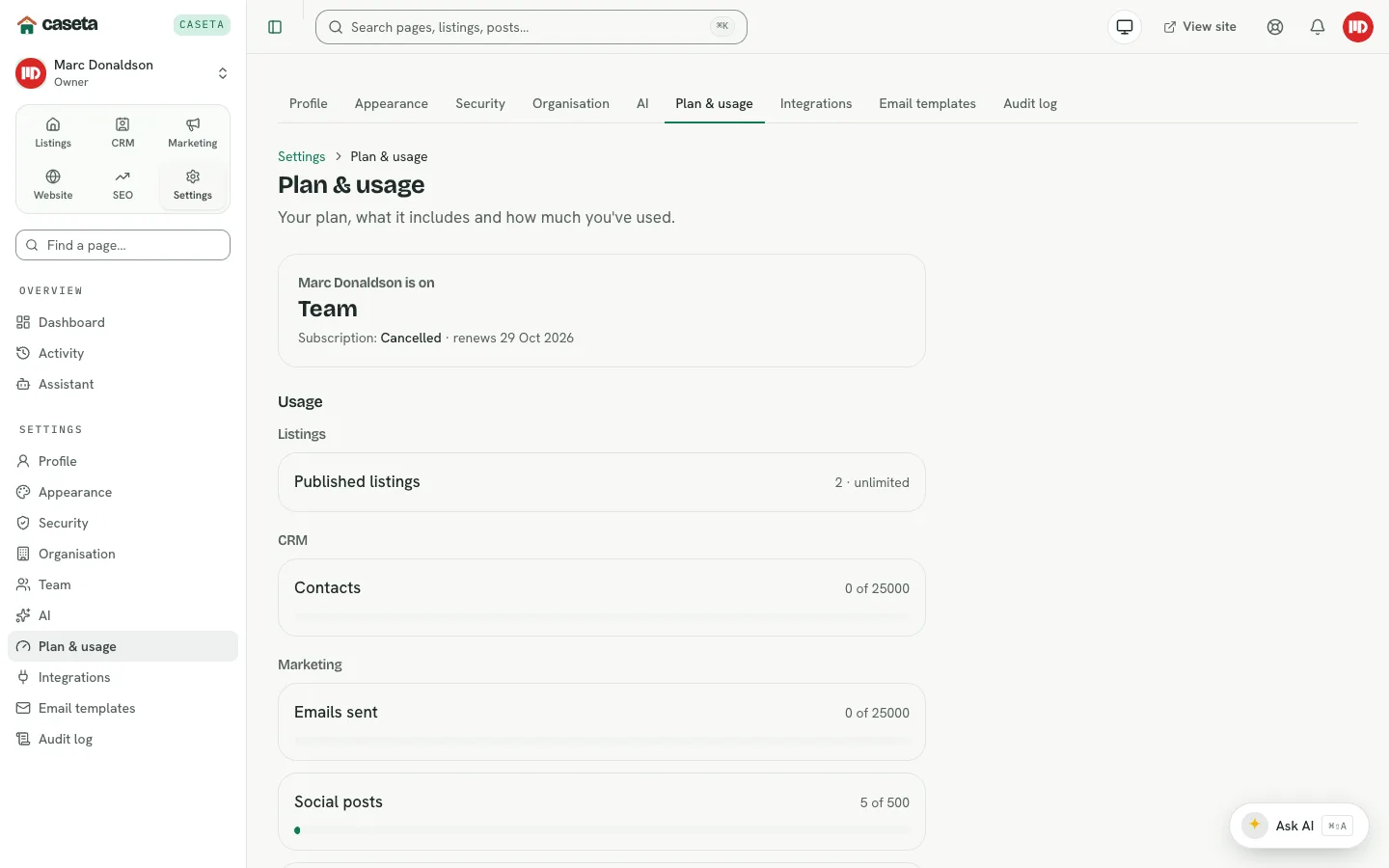
A plan can also be overridden for a specific organisation by Caseta admin (for trials or special arrangements). If a page you expect is missing, check Settings → Plan & usage and ask an admin.
Limits by plan
Listings, enquiries and CRM
| Limit | Free | Solo | Team |
|---|---|---|---|
| Published listings (at once) | 50 | Unlimited | Unlimited |
| Enquiries per month | 50 | Unlimited | Unlimited |
| Contacts | 0 | 5,000 | 25,000 |
| Open deals | 0 | Unlimited | Unlimited |
| Deal documents | 0 MB | 2,048 MB | 10,240 MB |
Marketing
| Limit | Free | Solo | Team |
|---|---|---|---|
| Emails sent per month | 0 | 5,000 | 25,000 |
| Social posts per month | 0 | 100 | 500 |
| Social accounts | 0 | 2 | 5 |
| Portal feeds | 0 | 2 | 10 |
| WhatsApp messages per month | 0 | 250 | 1,000 |
Storage, team and SEO
| Limit | Free | Solo | Team |
|---|---|---|---|
| Team members | 3 | 1 | 5 (3 included) |
| Media storage | 500 MB | 10,240 MB | 51,200 MB |
| Site health scans per month | 0 | 4 | 30 |
| Tracked keywords | 0 | 50 | 250 |
| Optimised pages | 0 | 200 | 1,000 |
Some SEO and WhatsApp limits are shown in the catalogue but are not yet enforced by a hard guard. They are still useful as planning guidance.
Shared AI requests
When the agency uses Caseta's shared AI provider, each request counts against the plan's monthly allowance:
| Plan | Shared AI requests / month |
|---|---|
| Free | 20 |
| Solo | 300 |
| Team | 1,500 |
- The counter resets on the 1st of each month.
- The allowance applies to the shared Caseta AI Model provider.
- If you add your own provider in Settings → AI, requests through your own provider are
not limited by the shared allowance.
- When the shared allowance is used up, AI actions fail with a clear message and a link to
Settings → Plan or Settings → AI.
What happens when you reach a limit
- Published listings: publishing is blocked until you unpublish/archive a listing or
upgrade.
- Enquiries: new enquiries past the monthly limit are stored locked; they are not lost.
You can unlock them by upgrading or waiting for the next month.
- Team members: invitations stop at the seat limit.
- Emails, social posts, portal feeds, storage and contacts: the related action is
blocked with a message until you free space or upgrade.
- The assistant: if a plan limit is full and you ask it to do that action, it shows a
Plan limit reached card with an Upgrade plan button. If a paid module is missing, it shows an Upgrade to Solo or Team card instead of pretending to act.
Nothing is deleted when you hit a limit. Existing data stays available; the action that would exceed the limit is refused.
How to change plan
- Open Settings → Plan & usage.
- Review the current plan, included modules and usage lines.
- Select Upgrade and choose Solo or Team.
- Complete the payment flow.
- For a cancellation, use the subscription actions on the same page. The plan may stay
active until the end of the billing period.
Only owners and admins can change the plan.
Which AI assistant tools come with which plan?
- Free: listings, enquiries, website, SEO, plans and usage, research and writing.
- Solo and Team: all of the above plus CRM, social media and portal-feed tools.
See the AI Assistant Tool Guide for the full tool list, example prompts and approval rules.
Common problems
- “Plan required” on a page. The module is not in the current plan. Upgrade in
Settings → Plan & usage.
- “Limit reached” on publishing or inviting. Free listings are capped at 50, enquiries
at 50/month and members at 3. Team has 5 seats; Solo has 1.
- Shared AI requests run out. Wait for the monthly reset, add your own provider in
Settings → AI, or upgrade.
- Prices look different from an old invoice. Prices and plan copy are editable by the
platform admin. The live Settings → Plan & usage page is authoritative.
- A feature is missing after changing plan. Downgrades remove paid modules; data is
retained but the related pages and tools are hidden or locked.