Editing a Listing
A complete reference to the Caseta listing editor: the header, 12 tabs, fields, badges, buyer matching and saving.
Overview
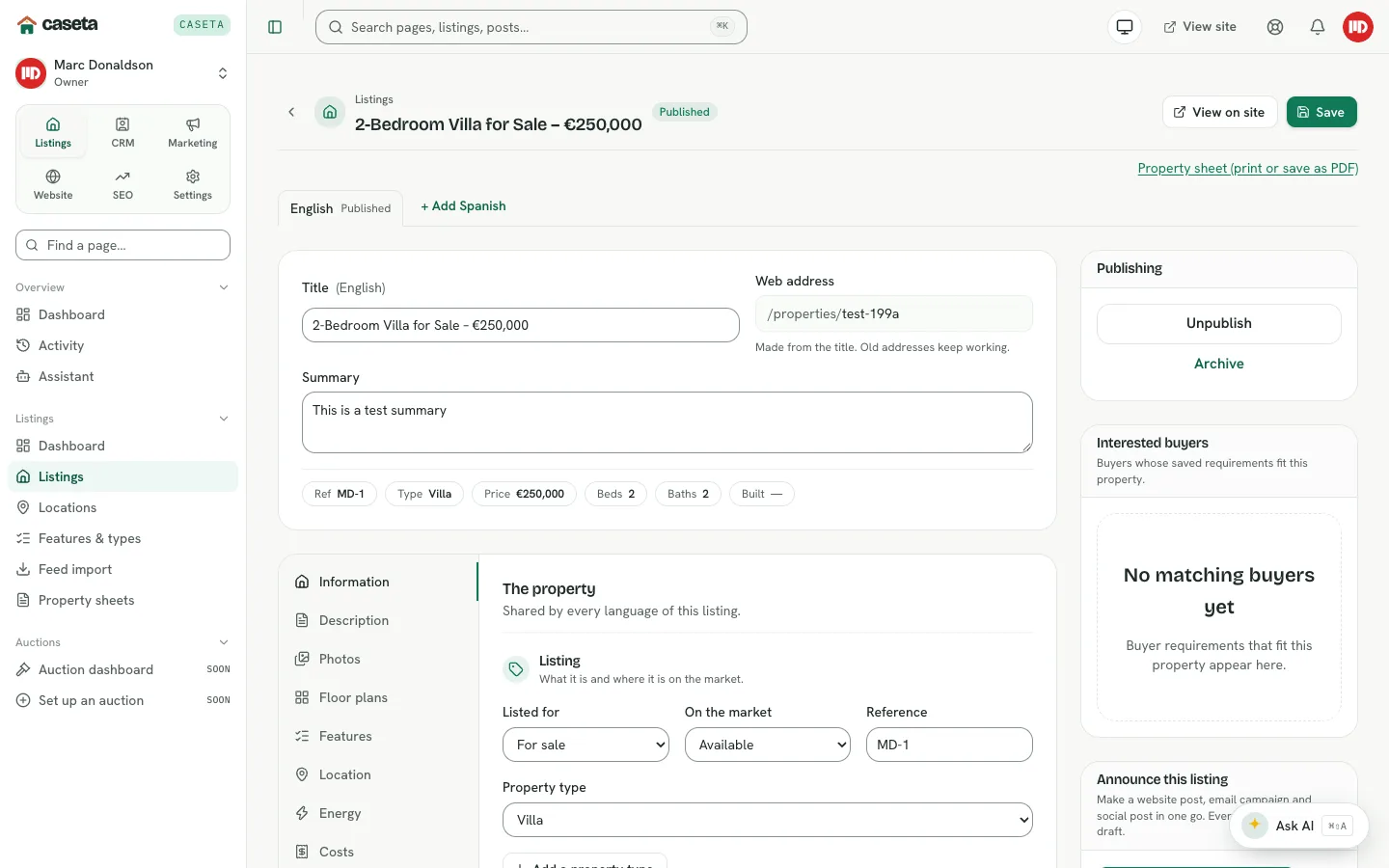
The listing editor is the single place to complete a property. The title, web address and summary stay visible at the top; the remaining facts are grouped into tabs so the page stays readable. A side column holds publishing, buyer interest and announcement actions. Every save is validated, and a refused field opens the tab that contains it.
Who Is This For?
Agents, admins and owners with listing access.
Before You Begin
- The property's facts, photos and description.
- At least one town and area if you want map and location data.
- Property photos as WebP/JPEG/PNG files; the browser converts them to WebP.
The header
| Field | Purpose | Validation | Required? | Notes |
|---|---|---|---|---|
| Title | The listing name | 1–200 characters | Yes | Shown in lists and on the public page |
| Web address | The public address | Generated from the title | — | Read-only; old addresses keep working |
| Summary | A short introduction | Up to 500 characters | No | Used on cards and as the SEO description fallback |
Use the language tabs to edit the English record and any translations. The base record is the one marked Published or Draft; + Add Spanish (or another language) creates a translation.
Step-by-Step Instructions
Information tab
The core facts and price.
| Field | Purpose | Validation |
|---|---|---|
| Listed for | Sale or rent | Sale/rent |
| On the market | Available, reserved, sold, etc. | A supported market status |
| Reference | Internal code | Up to 40 characters |
| Property type | Classification | Existing type |
| Price | Asking price | Whole number, 0 or more |
| Previous price | Optional comparison price | Whole number, 0 or more |
| Currency | Price currency | Three-letter code |
| Price period | Per month/week for rentals | A supported period |
| Price on request | Hide the amount | On/off |
| Bedrooms / Bathrooms | Room counts | 0–100 |
| Parking spaces | Parking count | 0–100 |
| Built area / Useful area / Plot / Terrace / Garden | Sizes in m² | Whole numbers within the limits |
| Floors / Floor level | Building layout | Supported ranges |
| Year built / Year renovated | Construction dates | 1500–2200 |
| Condition / Furnishing | Property state | Supported lists |
| Featured / Exclusive / New build | Card badges | On/off |
| Highlights | Short selling points | Up to the configured maximum, each within the length limit |
The header summary line updates as you type the key facts.
Description tab
The full description is a rich-text body. Use headings, lists and links to make it readable. The body is stored with the listing and shown on the public page.
Photos tab
Upload and order photos. See Managing Property Photos.
Floor plans tab
Upload floor-plan images, order them and remove them. The same image rules apply.
Features tab
Tick the features that apply. Some features ask for a count or a short detail. Use the feature search to find one quickly. Owners and admins can add agency-specific features without affecting other agencies.
Location tab
| Field | Purpose | Validation |
|---|---|---|
| Town | The town | Existing town |
| Area | A smaller area inside the town | Existing area |
| Address | Private street address | Up to 200 characters |
| Postcode | Postal code | Up to 12 characters |
| Latitude / Longitude | Exact map position | Both or neither, within valid ranges |
| Show the exact spot | Whether the public map shows the pin | On/off; otherwise a circle around the area |
| Orientation | Facing direction | Supported list |
| Views | What can be seen | Supported list |
| Distances | Beach, airport, shops, school, golf | Metres, within the limit |
The address is private: only your team sees it. The public map uses the area unless Show the exact spot is on.
Energy tab
| Field | Purpose | Validation |
|---|---|---|
| Energy rating | The certificate grade | Supported rating |
| Energy use | Consumption in kWh/m² | Number, 0 or more |
| Emissions rating | Emissions grade | Supported rating |
| Emissions value | kg CO₂/m² | Number, 0 or more |
The page renders a coloured energy scale from the values.
Costs tab
Community fees (monthly), IBI (yearly) and basura (yearly). Whole amounts in the listing's currency.
Tour & video tab
Virtual tour and video links. Both must be full https:// addresses.
Sharing tab
| Field | Purpose | Notes |
|---|---|---|
| Shareable | Lets other agencies and collaborators see the property | Prerequisite for collaboration offers |
| Include in portal exports | Includes the property in portal XML feeds | Off keeps it off every feed |
| Collaborator's share | Percentage of the agency commission offered | 0–100 |
| Sharing note | Terms or instructions the partner sees | Up to 2,000 characters |
Private note tab
A private note for the team. It is never shown on the public site. The editor shows the remaining character count.
SEO tab
| Field | Purpose | Validation | Notes |
|---|---|---|---|
| Title for search results | The page title in search | Up to 70 characters | Empty uses the listing title |
| Description | The meta description | Up to 160 characters | Empty uses the summary |
Buttons and Actions
- Save — validates and stores the current form. A refused field opens its tab.
- Property sheet (print or save as PDF) — opens the printable brochure.
- Unpublish / Publish now / Schedule — changes the publishing state.
- Archive — removes the listing from the active list.
- Announce this listing — creates website, email and social drafts where the
corresponding features are available.
- Dismiss on a suggested buyer — hides that match.
Panels and Sections
- Publishing — status actions and scheduling.
- Interested buyers — buyers whose saved requirements fit this listing.
- Announce this listing — one-action marketing drafts.
- Language tabs — base record and translations.
What Happens Next?
Saving updates the record immediately but does not publish it. Publishing makes the listing available to the public site and to features that use published listings.
Common Problems
- A save is refused. The error names the field and opens the correct tab. Fix the
value and save again.
- Unsaved changes warning. The editor asks before leaving a form with unsaved edits.
- No suggested buyers. Buyer matching needs at least one contact with saved
requirements and suitable published listings.
- The map shows only a circle. Turn on Show the exact spot after setting both
coordinates.
- A feature is missing. Add it in Listings → Features & types (owners/admins).
Frequently Asked Questions
Do translations share the same photos? Property facts and photos are shared; the title, summary and description are language-specific.
Can I edit a listing imported from a feed? Yes, but a later feed run may overwrite feed-owned fields. Check the feed's change history.
Does changing the title change the URL? No. The existing web address stays and old addresses keep working.